Built for gigging musicians, worship bands & studio players

Play the Number System — reference, build, and convert in one workspace.

The Number System Studio is an interactive workspace: tap any scale degree to hear it, build charts on the fly, and convert any chord chart into Nashville numbers — in every key, on any device.

$5.99/month · Full access to every tool. Have a promo code? Enter it at checkout.

About NashvillePro

A number system you can actually play.

NashvillePro turns the Nashville Number System into a tool you can actually play. Hear every degree, see every shape in every key, build progressions on the fly, and convert any chord chart into numbers in seconds.

How the NNS conversion works

Instead of “G, Em, C, D,” the chart just says 1 – 6m – 4 – 5. Change keys, change capos, change singers — the chart never changes.

  1. 1

    Upload or paste your chart

    Drop in a PDF, DOCX, or plain-text chord chart. Chord placement above the lyrics is preserved exactly as written.

  2. 2

    Pick the original key

    NashvillePro maps every chord to its scale degree — majors, minors, diminished, and slash chords included.

  3. 3

    Play, edit, and export

    Hear the progression, edit any degree by hand, then export a clean color PDF with the title and artist on top.

1C
2mDm
4F
5G
Nashville Number System chart example · key of C · same chart works in every key

Everything a working musician needs

One studio for learning, practicing, and prepping charts.

Number System Studio

The central workspace for navigating the Nashville Number System. Reference every key, build charts, and convert songs without switching contexts.

  • Interactive scale-degree reference
  • Chart builder & converter in one view
  • Optimized for desktop and mobile
Launch the studio

Instant NNS Chart Builder

Drag intro, verse, chorus, and bridge sections into a full Nashville Number System chart, set the tempo, and loop playback before the gig.

  • Reorder, duplicate, or delete sections
  • Loop playback at any tempo
  • High-contrast dark mode for the stage

Chord to NNS Converter

Upload a PDF, DOCX, or text chord chart and convert it to a formatted Nashville Number System chart with chords preserved above the lyrics.

  • Majors, minors, and slash chords
  • Edit the converted result by hand
  • Export a color PDF with title and artist

Learn NNS: Key Reference Guide

A lightning-fast reference for every key. Tap a number to hear the chord, see the CAGED shape, and map the root notes across the fretboard.

  • Tap degrees for live playback
  • CAGED shapes in every key
  • Plain-language theory lessons
Open the key reference guide

See it in action

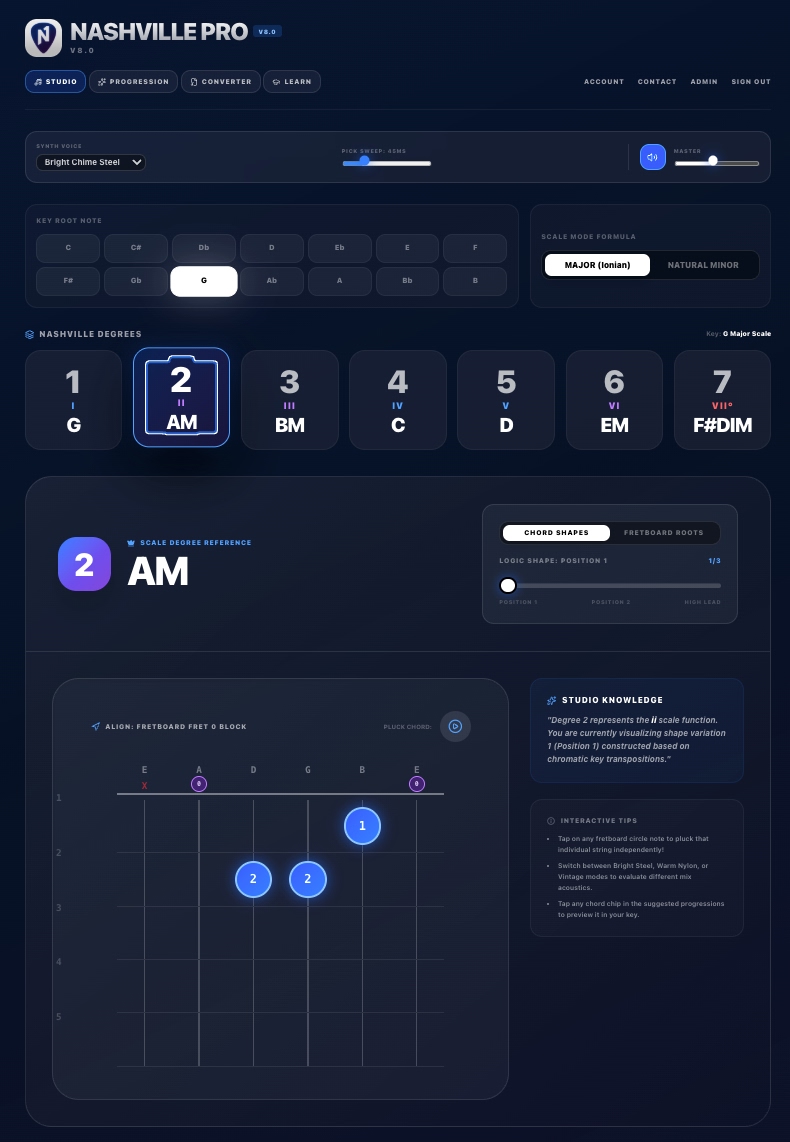
A live look at the studio — tap a number, see the shape, hear the chord.

Nashville Number System chart example showing the 2 (Am) degree with its CAGED chord shape in the key of G

Chord shapes for every degree

Pick a number and instantly see the real fingering on the neck — in any key.

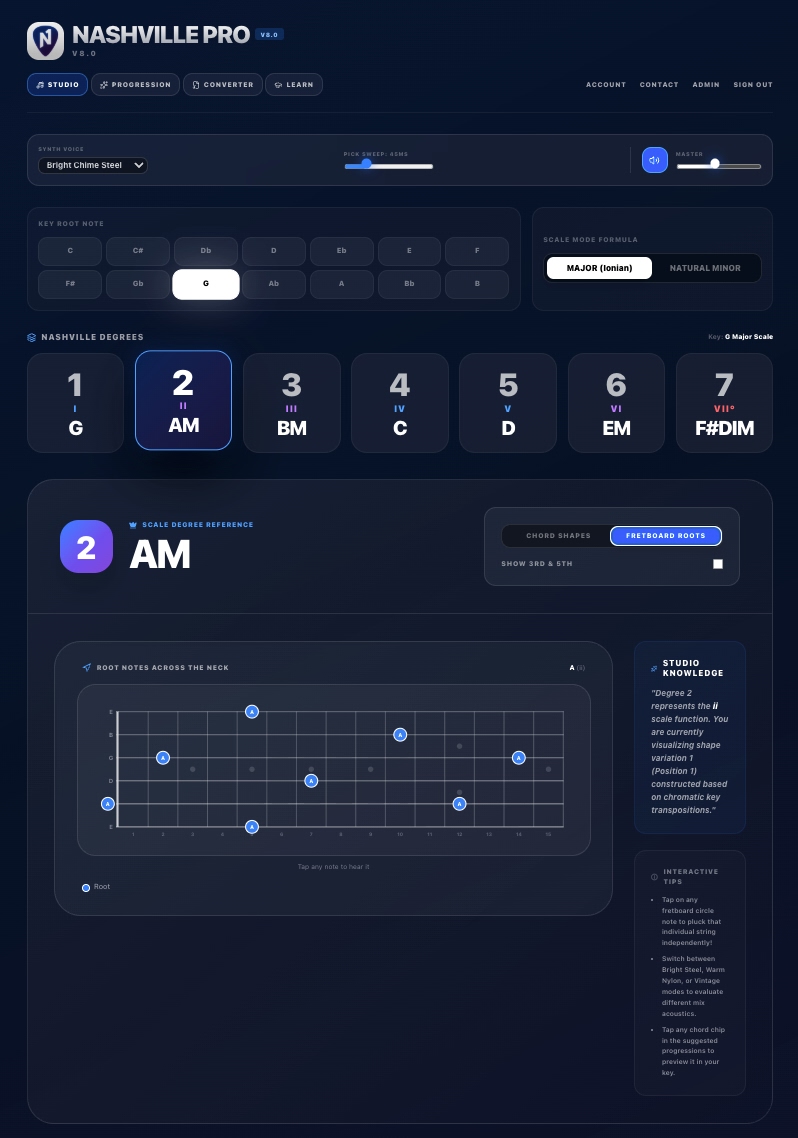
Nashville Number System root notes for the 2 degree mapped across a guitar fretboard

Root notes across the neck

Flip to Fretboard Roots to map every position — tap a note to hear it played.

Who it's for

  • Session & touring players

    Read numbers the way the pros write them, and transpose on the fly when the singer changes keys.

  • Worship & church teams

    Rehearse in any key. Your team's charts stay portable and singer-friendly week after week.

  • Students & teachers

    Learn to hear function, not just chord names. Build ear training that actually sticks.

Nashville Number System FAQ

The basics, answered — for players who are brand new to numbers.

What is the Nashville Number System?

The Nashville Number System is a chord-charting shorthand that replaces chord names with scale degrees. Instead of writing G – Em – C – D, a chart reads 1 – 6m – 4 – 5, so the same chart works in every key.

How do I convert a chord chart to Nashville numbers?

Upload a PDF, DOCX, or plain-text chord chart to the NashvillePro converter, choose the original key, and the app returns a formatted Nashville Number chart with the chord positions preserved above the lyrics. You can edit the result and export it as a color PDF.

Do the numbers change when the singer changes keys?

No. That is the whole point of the system. The numbers describe function, not pitch, so one chart covers every key. In NashvillePro you switch keys with a single tap and the numbers stay put while the chord names update.

What do the minor and diminished symbols mean?

A lowercase m after a number means a minor chord (2m, 3m, 6m). A degree sign means diminished (7°). A slash such as 1/3 means the 1 chord played over the 3 in the bass.

Is NashvillePro useful for worship teams?

Yes. Worship and church bands are one of the biggest groups using the system, because vocalists often need different keys week to week. One number chart serves the whole team regardless of key or capo position.

How much does NashvillePro cost?

NashvillePro is $5.99 per month for full access to the chart builder, the chord-to-NNS converter, the key reference guide, and all export tools. You can cancel anytime.

Simple pricing. Full access.

One plan for solo players. One for the whole band. Cancel anytime.

NashvillePro

$5.99/mo

Full access to every tool. Have a promo code? Enter it at checkout.

  • All 12 keys, major & minor modes
  • Live degree playback with CAGED shapes
  • Drag-and-drop song chart builder
  • AI chart-to-Nashville converter
  • PDF, DOCX & text chart uploads
  • Mobile-friendly for the gig
Launch Number System Studio

Cancel anytime. No hidden fees.

NashvillePro Teams

$49.99/mo

For bands, worship teams & studios. Full access for you, plus 10 studio seats to hand out.

  • Everything in NashvillePro for the plan owner
  • 10 assignable seats for your bandmates
  • Seats include the Number System Studio
  • Seats include the key reference guide
  • Invite and remove players any time by email
  • One bill for the whole team
Get Teams

Cancel anytime. No hidden fees.